Work while you're away
Before you leave, the Orchestrator can plan jobs for while you are away: for an hour, an afternoon or the night. Each job works in its own copy of the project, so your project does not change while you are gone. When you are back you decide what comes in.
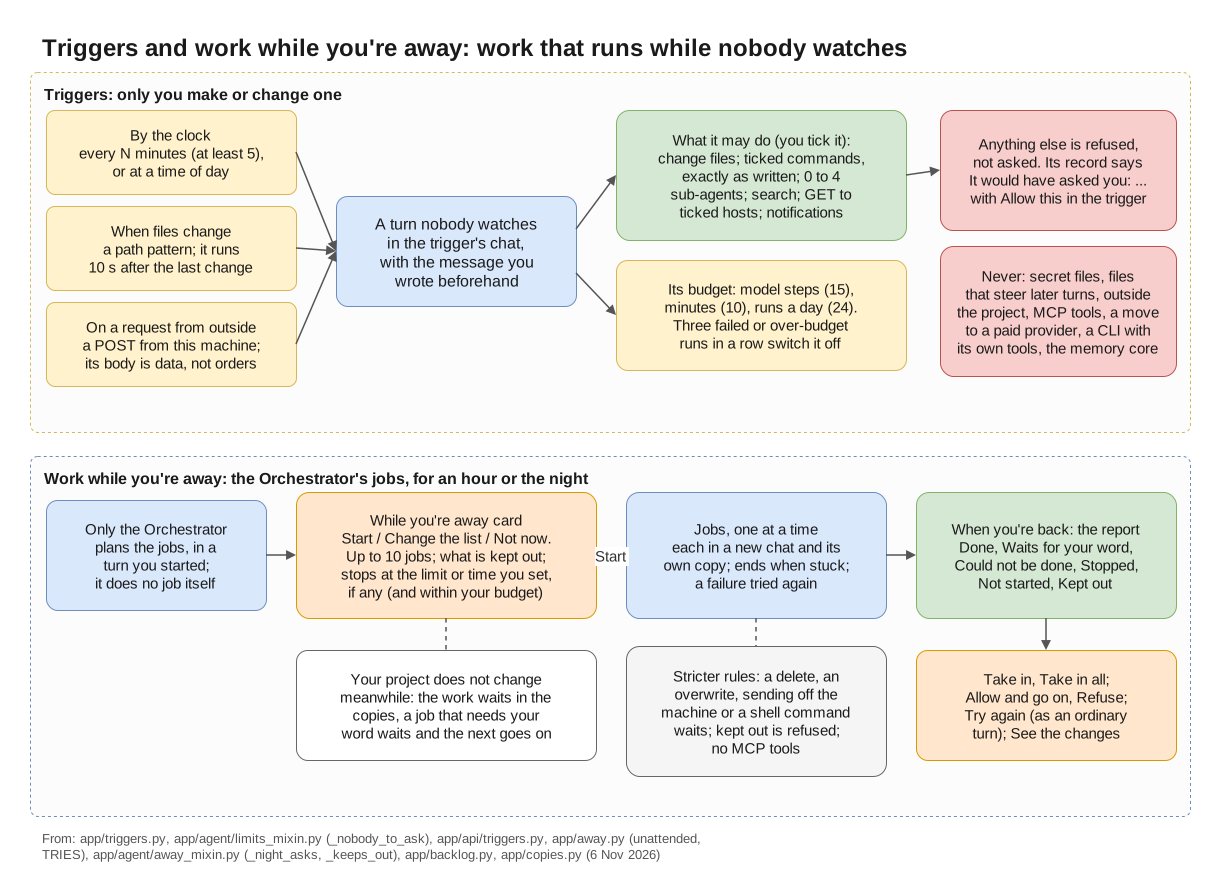
Work while you're away (below) and triggers (above): work that runs while nobody watches.
Planning the jobs
Tell the Orchestrator you are going away (to sleep, out, for a while) and what it should work on meanwhile. It does none of that work itself. It puts the jobs on a While you're away card instead, and nothing starts before your Start.
Only the Orchestrator plans these jobs, in a turn you started, in a chat with a folder, where it keeps the To-do list. It does not plan them in a Plan first turn, nor while jobs of the project run while you're away. A newer card takes the place of one not started yet.
The jobs
A card has 1 to 10 jobs, in the order they run. Each job has:
- a title, one plain line of at most 200 characters;
- optionally, what makes it done;
- optionally, a team, and a recipe for it; without a recipe the team works by its default recipe. A recipe with no team is not used.
The card
The card says "The Orchestrator's jobs for while you're away: change anything before you start."
- "Each job works in its own copy. Your project does not change while you're away; you take the work in when you're back."
- "If a job needs your word, it waits and the next one goes on." See Questions and approvals.
- What is kept out: files or folders of the project no job may change.
- When to stop: Stop at a time, or after spending an amount, whichever comes first. By default there is no time limit and no spend limit: the jobs run until they are done. Set a time or an amount (in the currency of your prices) on the card, or tell the Orchestrator, if you want one. If the project has a monthly budget, the jobs spend at most what is left of it. Empty a field and that limit is off; the card says "(empty: no time limit)" and "(empty: no spend limit)". On a provider paid by plan no money is counted, and the card says so: "there only the time holds". Your provider limits hold too.
- A job works as long as it makes progress. Once nothing has moved for Settings › The app › Stuck after this many minutes with no progress (30 unless you change it) - no file of the job changed, no agent finished its work, no failing command passed - it fails with that reason, is tried once more, and the next one goes on. As a last resort a job stops after An unattended turn runs at most (hours) (8 unless you change it; empty: no limit), what it did kept in its copy; on the report it is under Could not be done, with "Stopped after 8 hours, the most one job works".
Change the list lets you edit each job and what makes it done, take a job out (one must stay), add
one with + Add a job (up to 10), and change what is kept out: up to 20 files or folders of the
project, one a line or with commas between. Name the file or folder itself: a pattern such as
src/* or a place outside the project is refused. Then Save the list, or Cancel.
Start starts the jobs; they go onto the To-do list too. Not now puts the card away. Start is refused while Stop everything holds (press Resume first), and while a To-do task is at work.
The card can also offer Let the Orchestrator answer what it safely can. It turns on the project's When you're away setting, which then stays on after the jobs; change it back under Settings › This project › Asking and away. See Answering for you.
How the jobs run
Jobs run one at a time, in the card's order. Each starts in a new chat named after it, its first message the job and what makes it done, and works in a copy of the project of its own.
- Level and model: the job's chat has the permission level and the model of the chat where the card was, not the To-do page's run settings. Its other settings are the project's, as in any chat: who changes the files, opening sub-agents, and the rest.
- Team and recipe: a job with a team works in Manual with that team, by the recipe the card gave.
- The copy leaves out
.git/,build/,dist/and caches, and sharesnode_modules/,.venv/andvenv/with the project. A job that needs what is not in the copy changes nothing and waits for you, its report ending "Needs the project itself: …". - A job that fails is tried once more in its chat. Failed twice, it could not be done, and the next one goes on.
- A job that waits for your word waits, and the next one goes on.
The top bar shows "☾ Away · job 2 of 4" with Stop all, and "· until 07:00" after it when the card has a stop time. The To-do page shows the jobs too: since when, what they spent against the limit, and each job as it stands, with what its agents are doing right now. A job's chat says at the top when its jobs started, with a link back to their report.
Stricter rules while you're away
- Commands follow the job chat's level. Below Full auto, a command no rule covers waits for you, and the job with it. At every level these wait too: a command that deletes, overwrites or sends something off the machine; one that hands a command to a shell or another program; and one that installs into the project's shared dependency folders.
- Ordinary file changes in the job's copy never ask: they are kept for your Take in. Files that steer agents, secret files and places outside the project wait for you as in a watched turn, and the job with them.
- Kept-out places: a write to one, or a command that names one, is refused, and the try is on the report.
- No MCP server tools are used.
- CLIs: a CLI working with its own tools that is not started in the job's copy, or not held to it (Copilot working Native, agy when it may write), cannot work on a job: "… cannot work on a job while you're away".
- At Full auto the Orchestrator does not answer KOLONİ's own cards while you're away, as it does while you watch.
Questions and approvals
What needs your word waits for you, and the job waits with it. The next job goes on meanwhile.
With When you're away set to The Orchestrator answers what it safely can, the Orchestrator answers at once while the jobs run, without waiting the minutes you set. It answers only an agent's question, a recipe's "Ask me", and opening a sub-agent on its role's own model; it does not answer once the project is over its monthly budget or a provider is over its limit. Everything else waits: commands and changes that ask, the web, secrets, folders, new roles and skills. See Answering for you.
A job that waits is shown under Waits for your word, on the report and in Ready for you.
Step limits while away
Nobody is there to answer a Continue / Stop here card, so none comes:
- A sub-agent that reaches its step limit stops. The job's Orchestrator is told its part is not done, and may tell it once to go on, with a new step limit.
- One that stopped at its role's own limit, or stops again, ends. The job's Orchestrator hands what is left to another agent, or says in its report what is left undone. The job can still count as done: read its chat.
- The job's Orchestrator counts no steps. If it goes round in circles (the same call failing the same way 5 times, or 10 calls in a row bringing nothing new), the job fails with that reason, is tried once more in its chat, and the night goes on with the next job.
See Step limits.
What stops the jobs
The jobs end when:
- every job was tried;
- the card's stop time comes, if it has one ("Stopped at 07:00, the time you set.");
- they have spent their money ("Stopped at 5.02 of 5.00 USD, the spend limit.");
- the project is over its monthly budget, or the Orchestrator's provider is over its limit, when the next job is about to start;
- you press Stop all ("Stopped by you.");
- KOLONİ is closed ("Stopped: KOLONİ was closed while you were away.");
- the next job cannot start.
The time and the money are checked before each model step. A clock also watches the stop time and each job's hours at most, so a long command is cut at them too. Its minutes with nothing moving do not run out while a command or a model step of it is under way, an agent below the Orchestrator is at work, or it waits for your word: those have limits of their own. When the jobs stop, the job at work stops, its work kept in its copy, and is shown as Stopped. A job that waits for your word goes on waiting. When KOLONİ is closed, the jobs at work and those that wait count as could not be done: answer what waits before you close KOLONİ.
Stop everything in the top bar holds the jobs instead of ending them: the job at work and a job that waits for your word are stopped, the next job waits for Resume, and the card's time and money still end them.
A trigger's budget plays no part here: these jobs are not trigger turns.
If you set up notifications, you get one when the jobs end.
When you're back
KOLONİ opens on the report on the canvas until you have seen it. The chat where the card was has one line, such as "While you were away: 3 done, 1 waits - on the canvas".
The report shows when the jobs ran, what they spent and why they ended; nothing of it is in your project before you take it in. Its sections are Done, Waits for your word, Could not be done, Stopped, Not started, Proposed while you were away, not started (with Add to To-do or Dismiss) and Kept out, as you asked (what tried to change those places, refused).
Each job row says what its reviews found, and warns where its copy changed a place you kept out, or a file another job changed too. A job that changed nothing is "Done, nothing changed". For each job:
- Allow and go on or Refuse, when it waits for a command, a change, a web request or an agent to open. A question, a folder or a secret is answered in its chat: Open its chat. The job then goes on in its copy.
- Take in brings its work into the project; Take in all takes in every done job's work. Where two jobs changed one file, the two are joined line by line where their lines do not clash. A clashing line is not taken: the card of the job's kept copy, in its chat, decides it.
- Try again, for a job that could not be done or was stopped, once the jobs are over. It runs in the job's chat as an ordinary turn, not in a copy: its changes go into the project as that chat's level says.
- See the changes or Open its chat.
The To-do page shows the same jobs, open by itself while a job needs a decision of yours.
See A job while you're away for the steps from planning to taking the work in.